> ## Documentation Index
> Fetch the complete documentation index at: https://dify-6c0370d8-release-1-15-0.mintlify.site/llms.txt
> Use this file to discover all available pages before exploring further.
# Trigger Plugin
> Build a Dify 1.10.0+ trigger plugin that turns third-party webhook events into workflow start signals
## What Is a Trigger Plugin?
Triggers were introduced in Dify v1.10.0 as a new type of start node. Unlike functional nodes such as Code, Tool, or Knowledge Retrieval, a trigger **converts third-party events into an input format that Dify can recognize and process**.
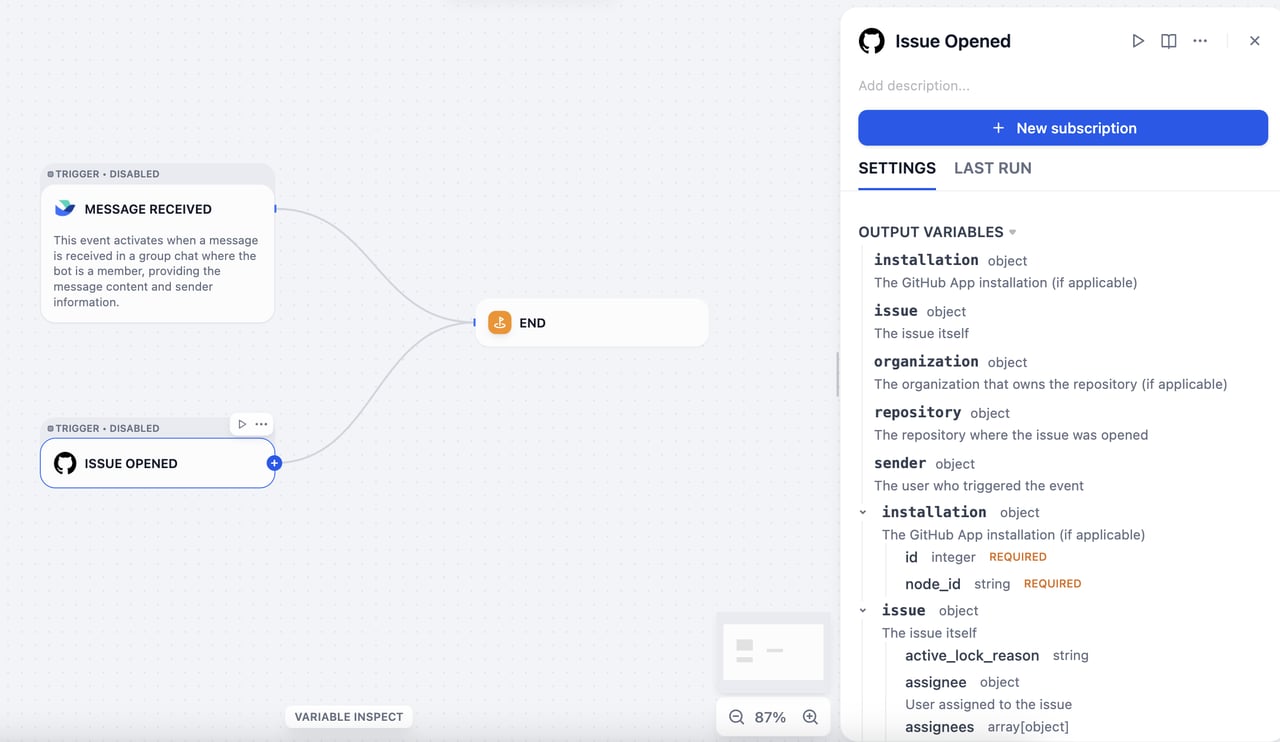 For example, if you configure Dify as the `new email` event receiver in Gmail, Gmail automatically sends an event to Dify every time you receive a new email, and that event can trigger a workflow. However:
* Gmail's original event format is not compatible with Dify's input format.
* There are thousands of platforms worldwide, each with its own unique event format.
Trigger plugins close this gap: they define and parse events from different platforms and unify them into an input format that Dify can accept.
## Technical Overview
Dify triggers are built on webhooks, a widely adopted mechanism across the web. Mainstream SaaS platforms such as GitHub, Slack, and Linear support webhooks and document them thoroughly.
A webhook is an HTTP-based event dispatcher: once you configure an event-receiving address, the platform automatically pushes event data to that address whenever a subscribed event occurs.
To handle webhook events from different platforms in a unified way, Dify defines two core concepts: **Subscription** and **Event**.
* **Subscription**: The configuration that registers Dify's network address as the target server in a third-party platform's developer console.
* **Event**: A platform may send multiple types of events (such as *email received*, *email deleted*, or *email marked as read*), all pushed to the registered address. A trigger plugin can handle multiple event types, and each event corresponds to a Plugin Trigger node in a Dify workflow.
## Plugin Development
Developing a trigger plugin follows the same process as other plugin types (Tool, Data Source, Model, and so on).
Create a development template with the `dify plugin init` command. The generated file structure follows the standard plugin format specification.
```text theme={null}
├── _assets
│ └── icon.svg
├── events
│ └── star
│ ├── star_created.py
│ └── star_created.yaml
├── main.py
├── manifest.yaml
├── provider
│ ├── github.py
│ └── github.yaml
├── README.md
├── PRIVACY.md
└── requirements.txt
```
* `manifest.yaml`: Describes the plugin's basic metadata.
* `provider` directory: Contains the provider's metadata, the code for creating subscriptions, and the code for classifying events after receiving webhook requests.
* `events` directory: Contains the code for event handling and filtering, which supports local event filtering at the node level. You can create subdirectories to group related events.
For trigger plugins, set the minimum required Dify version to `1.10.0` and the SDK version to `>= 0.6.0`.
The following sections use GitHub as an example to walk through the development process.
### Create a Subscription
Webhook configuration methods vary significantly across mainstream SaaS platforms:
* Some platforms (such as GitHub) support API-based webhook configuration. For these platforms, once OAuth authentication is completed, Dify can automatically set up the webhook.
* Other platforms (such as Notion) do not provide a webhook configuration API and may require users to perform manual authentication.
To accommodate these differences, we divide the subscription process into two parts: the **Subscription Constructor** and the **Subscription** itself.
For platforms like Notion, creating a subscription requires the user to manually copy the callback URL provided by Dify and paste it into their Notion workspace to complete the webhook setup. This process corresponds to the **Paste URL to create a new subscription** option in the Dify interface.
For example, if you configure Dify as the `new email` event receiver in Gmail, Gmail automatically sends an event to Dify every time you receive a new email, and that event can trigger a workflow. However:
* Gmail's original event format is not compatible with Dify's input format.
* There are thousands of platforms worldwide, each with its own unique event format.
Trigger plugins close this gap: they define and parse events from different platforms and unify them into an input format that Dify can accept.
## Technical Overview
Dify triggers are built on webhooks, a widely adopted mechanism across the web. Mainstream SaaS platforms such as GitHub, Slack, and Linear support webhooks and document them thoroughly.
A webhook is an HTTP-based event dispatcher: once you configure an event-receiving address, the platform automatically pushes event data to that address whenever a subscribed event occurs.
To handle webhook events from different platforms in a unified way, Dify defines two core concepts: **Subscription** and **Event**.
* **Subscription**: The configuration that registers Dify's network address as the target server in a third-party platform's developer console.
* **Event**: A platform may send multiple types of events (such as *email received*, *email deleted*, or *email marked as read*), all pushed to the registered address. A trigger plugin can handle multiple event types, and each event corresponds to a Plugin Trigger node in a Dify workflow.
## Plugin Development
Developing a trigger plugin follows the same process as other plugin types (Tool, Data Source, Model, and so on).
Create a development template with the `dify plugin init` command. The generated file structure follows the standard plugin format specification.
```text theme={null}
├── _assets
│ └── icon.svg
├── events
│ └── star
│ ├── star_created.py
│ └── star_created.yaml
├── main.py
├── manifest.yaml
├── provider
│ ├── github.py
│ └── github.yaml
├── README.md
├── PRIVACY.md
└── requirements.txt
```
* `manifest.yaml`: Describes the plugin's basic metadata.
* `provider` directory: Contains the provider's metadata, the code for creating subscriptions, and the code for classifying events after receiving webhook requests.
* `events` directory: Contains the code for event handling and filtering, which supports local event filtering at the node level. You can create subdirectories to group related events.
For trigger plugins, set the minimum required Dify version to `1.10.0` and the SDK version to `>= 0.6.0`.
The following sections use GitHub as an example to walk through the development process.
### Create a Subscription
Webhook configuration methods vary significantly across mainstream SaaS platforms:
* Some platforms (such as GitHub) support API-based webhook configuration. For these platforms, once OAuth authentication is completed, Dify can automatically set up the webhook.
* Other platforms (such as Notion) do not provide a webhook configuration API and may require users to perform manual authentication.
To accommodate these differences, we divide the subscription process into two parts: the **Subscription Constructor** and the **Subscription** itself.
For platforms like Notion, creating a subscription requires the user to manually copy the callback URL provided by Dify and paste it into their Notion workspace to complete the webhook setup. This process corresponds to the **Paste URL to create a new subscription** option in the Dify interface.
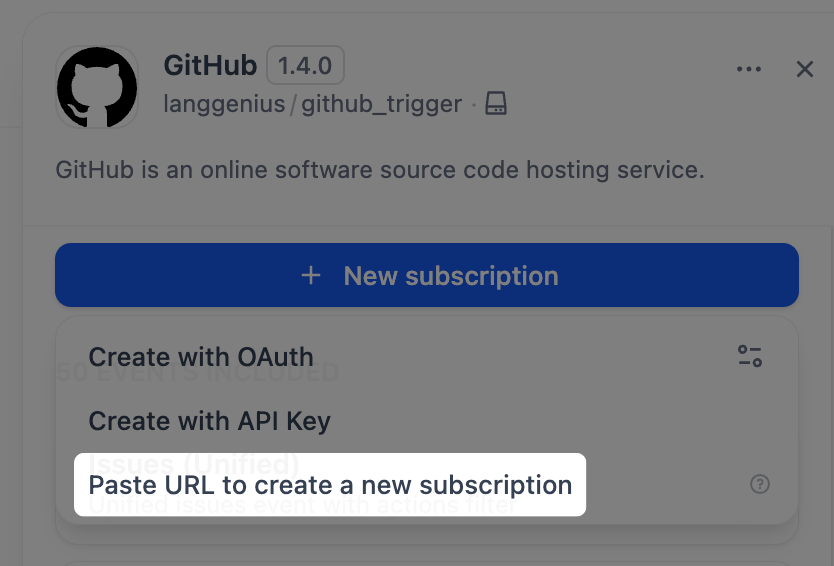 To support subscription creation via manual URL pasting, modify two files: `github.yaml` and `github.py`.
GitHub webhooks use an encryption mechanism, so a secret key is required to decrypt and validate incoming requests. Declare `webhook_secret` in `github.yaml`.
```yaml theme={null}
subscription_schema:
- name: "webhook_secret"
type: "secret-input"
required: false
label:
zh_Hans: "Webhook Secret"
en_US: "Webhook Secret"
ja_JP: "Webhookシークレット"
help:
en_US: "Optional webhook secret for validating GitHub webhook requests"
ja_JP: "GitHub Webhookリクエストの検証用のオプションのWebhookシークレット"
zh_Hans: "可选的用于验证 GitHub webhook 请求的 webhook 密钥"
```
First, implement the `dispatch_event` interface. All requests sent to the callback URL are processed by this interface, and the processed events appear in the **Request Logs** section for debugging and verification.
To support subscription creation via manual URL pasting, modify two files: `github.yaml` and `github.py`.
GitHub webhooks use an encryption mechanism, so a secret key is required to decrypt and validate incoming requests. Declare `webhook_secret` in `github.yaml`.
```yaml theme={null}
subscription_schema:
- name: "webhook_secret"
type: "secret-input"
required: false
label:
zh_Hans: "Webhook Secret"
en_US: "Webhook Secret"
ja_JP: "Webhookシークレット"
help:
en_US: "Optional webhook secret for validating GitHub webhook requests"
ja_JP: "GitHub Webhookリクエストの検証用のオプションのWebhookシークレット"
zh_Hans: "可选的用于验证 GitHub webhook 请求的 webhook 密钥"
```
First, implement the `dispatch_event` interface. All requests sent to the callback URL are processed by this interface, and the processed events appear in the **Request Logs** section for debugging and verification.
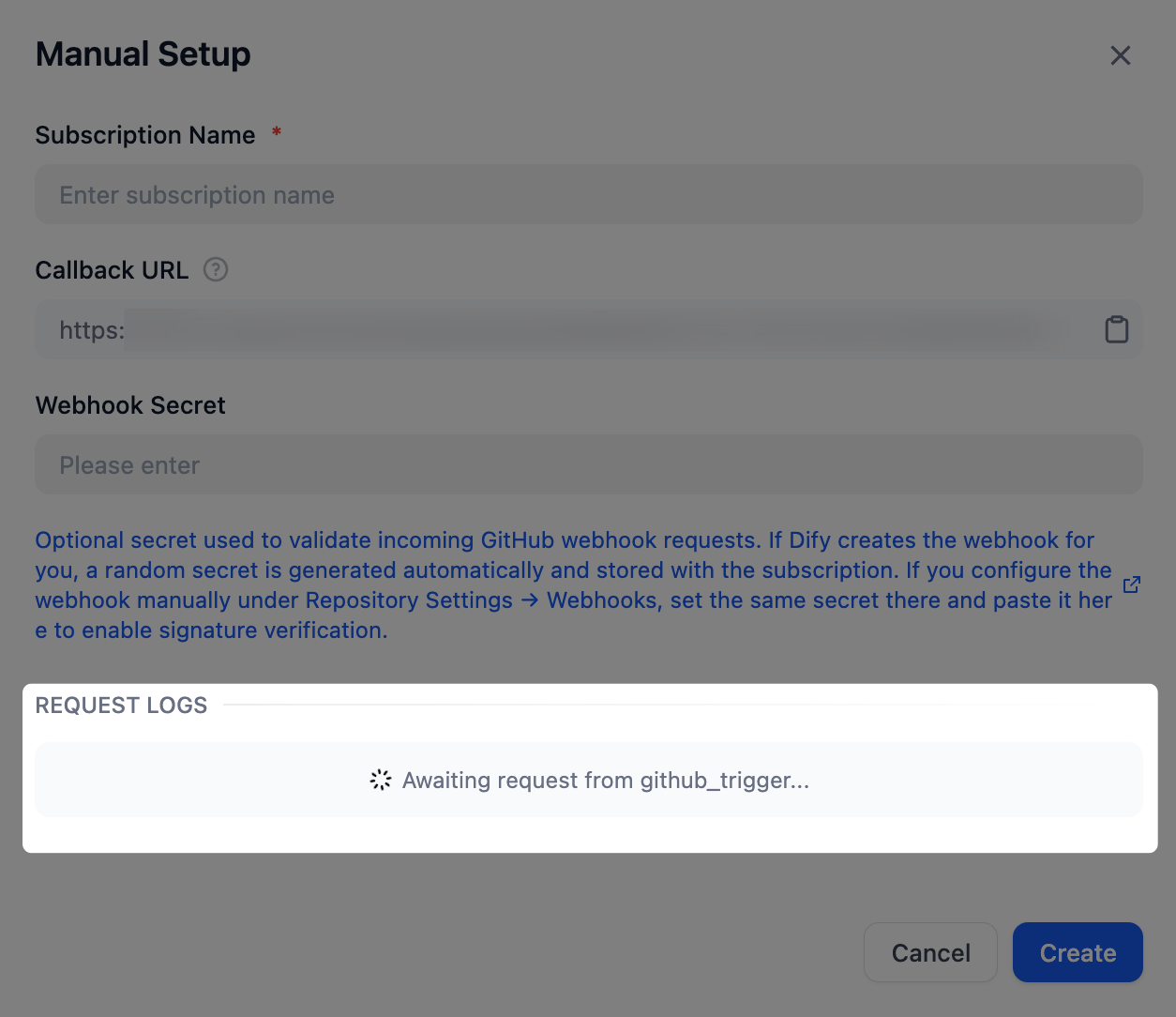 In the code, you can retrieve the `webhook_secret` declared in `github.yaml` via `subscription.properties`.
The `dispatch_event` method determines the event type from the request content. In the example below, the `_dispatch_trigger_event` method handles this extraction.
For the complete code sample, see [Dify's GitHub trigger plugin](https://github.com/langgenius/dify-plugin-sdks/tree/main/python/examples/github_trigger).
```python theme={null}
class GithubTrigger(Trigger):
"""Handle GitHub webhook event dispatch."""
def _dispatch_event(self, subscription: Subscription, request: Request) -> EventDispatch:
webhook_secret = subscription.properties.get("webhook_secret")
if webhook_secret:
self._validate_signature(request=request, webhook_secret=webhook_secret)
event_type: str | None = request.headers.get("X-GitHub-Event")
if not event_type:
raise TriggerDispatchError("Missing GitHub event type header")
payload: Mapping[str, Any] = self._validate_payload(request)
response = Response(response='{"status": "ok"}', status=200, mimetype="application/json")
event: str = self._dispatch_trigger_event(event_type=event_type, payload=payload)
return EventDispatch(events=[event] if event else [], response=response)
```
### Handle Events
Once an event is extracted, the corresponding implementation must filter the original HTTP request and transform it into an input format that Dify workflows can accept.
Taking the Issue event as an example, define the event in `events/issues/issues.yaml` and its implementation in `events/issues/issues.py`. Define the event's output in the `output_schema` section of `issues.yaml`, which follows the same JSON Schema specification as tool plugins.
```yaml theme={null}
identity:
name: issues
author: langgenius
label:
en_US: Issues
zh_Hans: 议题
ja_JP: イシュー
description:
en_US: Unified issues event with actions filter
zh_Hans: 带 actions 过滤的统一 issues 事件
ja_JP: アクションフィルタ付きの統合イシューイベント
output_schema:
type: object
properties:
action:
type: string
issue:
type: object
description: The issue itself
extra:
python:
source: events/issues/issues.py
```
```python theme={null}
from collections.abc import Mapping
from typing import Any
from werkzeug import Request
from dify_plugin.entities.trigger import Variables
from dify_plugin.errors.trigger import EventIgnoreError
from dify_plugin.interfaces.trigger import Event
class IssuesUnifiedEvent(Event):
"""Unified Issues event. Filters by actions and common issue attributes."""
def _on_event(self, request: Request, parameters: Mapping[str, Any], payload: Mapping[str, Any]) -> Variables:
payload = request.get_json()
if not payload:
raise ValueError("No payload received")
allowed_actions = parameters.get("actions") or []
action = payload.get("action")
if allowed_actions and action not in allowed_actions:
raise EventIgnoreError()
issue = payload.get("issue")
if not isinstance(issue, Mapping):
raise ValueError("No issue in payload")
return Variables(variables={**payload})
```
### Filter Events
To filter out certain events (for example, to focus only on Issue events with a specific label), add `parameters` to the event definition in `issues.yaml`. Then, in the `_on_event` method, raise an `EventIgnoreError` exception for events that don't meet the configured criteria.
```yaml theme={null}
parameters:
- name: added_label
label:
en_US: Added Label
zh_Hans: 添加的标签
ja_JP: 追加されたラベル
type: string
required: false
description:
en_US: "Only trigger if these specific labels were added (e.g., critical, priority-high, security, comma-separated). Leave empty to trigger for any label addition."
zh_Hans: "仅当添加了这些特定标签时触发(例如:critical, priority-high, security,逗号分隔)。留空则对任何标签添加触发。"
ja_JP: "これらの特定のラベルが追加された場合のみトリガー(例: critical, priority-high, security,カンマ区切り)。空の場合は任意のラベル追加でトリガー。"
```
```python theme={null}
def _check_added_label(self, payload: Mapping[str, Any], added_label_param: str | None) -> None:
"""Check if the added label matches the allowed labels"""
if not added_label_param:
return
allowed_labels = [label.strip() for label in added_label_param.split(",") if label.strip()]
if not allowed_labels:
return
# The payload contains the label that was added
label = payload.get("label", {})
label_name = label.get("name", "")
if label_name not in allowed_labels:
raise EventIgnoreError()
def _on_event(self, request: Request, parameters: Mapping[str, Any], payload: Mapping[str, Any]) -> Variables:
# ...
# Apply all filters
self._check_added_label(payload, parameters.get("added_label"))
return Variables(variables={**payload})
```
### Create Subscriptions via OAuth or API Key
To enable automatic subscription creation via OAuth or API key, modify the `github.yaml` and `github.py` files.
In `github.yaml`, add the following fields.
```yaml theme={null}
subscription_constructor:
parameters:
- name: "repository"
label:
en_US: "Repository"
zh_Hans: "仓库"
ja_JP: "リポジトリ"
type: "dynamic-select"
required: true
placeholder:
en_US: "owner/repo"
zh_Hans: "owner/repo"
ja_JP: "owner/repo"
help:
en_US: "GitHub repository in format owner/repo (e.g., microsoft/vscode)"
zh_Hans: "GitHub 仓库,格式为 owner/repo(例如:microsoft/vscode)"
ja_JP: "GitHubリポジトリは owner/repo 形式で入力してください(例: microsoft/vscode)"
credentials_schema:
access_tokens:
help:
en_US: Get your Access Tokens from GitHub
ja_JP: GitHub からアクセストークンを取得してください
zh_Hans: 从 GitHub 获取您的 Access Tokens
label:
en_US: Access Tokens
ja_JP: アクセストークン
zh_Hans: Access Tokens
placeholder:
en_US: Please input your GitHub Access Tokens
ja_JP: GitHub のアクセストークンを入力してください
zh_Hans: 请输入你的 GitHub Access Tokens
required: true
type: secret-input
url: https://github.com/settings/tokens?type=beta
extra:
python:
source: provider/github.py
```
`subscription_constructor` is a concept abstracted by Dify to define how a subscription is constructed. It includes the following fields:
* `parameters` (optional): Defines the parameters required to create a subscription, such as the event types to subscribe to or the target GitHub repository.
* `credentials_schema` (optional): Declares the credentials required to create a subscription with an API key or access token, such as `access_tokens` for GitHub.
* `oauth_schema` (optional): Required for subscription creation via OAuth. For details on how to define it, see [Add OAuth Support to Your Tool Plugin](/en/develop-plugin/dev-guides-and-walkthroughs/tool-oauth).
In `github.py`, create a `Constructor` class to implement the automatic subscription logic.
```python theme={null}
class GithubSubscriptionConstructor(TriggerSubscriptionConstructor):
"""Manage GitHub trigger subscriptions."""
def _validate_api_key(self, credentials: Mapping[str, Any]) -> None:
# ...
def _create_subscription(
self,
endpoint: str,
parameters: Mapping[str, Any],
credentials: Mapping[str, Any],
credential_type: CredentialType,
) -> Subscription:
repository = parameters.get("repository")
if not repository:
raise ValueError("repository is required (format: owner/repo)")
try:
owner, repo = repository.split("/")
except ValueError:
raise ValueError("repository must be in format 'owner/repo'") from None
events: list[str] = parameters.get("events", [])
webhook_secret = uuid.uuid4().hex
url = f"https://api.github.com/repos/{owner}/{repo}/hooks"
headers = {
"Authorization": f"Bearer {credentials.get('access_tokens')}",
"Accept": "application/vnd.github+json",
}
webhook_data = {
"name": "web",
"active": True,
"events": events,
"config": {"url": endpoint, "content_type": "json", "insecure_ssl": "0", "secret": webhook_secret},
}
try:
response = requests.post(url, json=webhook_data, headers=headers, timeout=10)
except requests.RequestException as exc:
raise SubscriptionError(f"Network error while creating webhook: {exc}", error_code="NETWORK_ERROR") from exc
if response.status_code == 201:
webhook = response.json()
return Subscription(
expires_at=int(time.time()) + self._WEBHOOK_TTL,
endpoint=endpoint,
parameters=parameters,
properties={
"external_id": str(webhook["id"]),
"repository": repository,
"events": events,
"webhook_secret": webhook_secret,
"active": webhook.get("active", True),
},
)
response_data: dict[str, Any] = response.json() if response.content else {}
error_msg = response_data.get("message", "Unknown error")
error_details = response_data.get("errors", [])
detailed_error = f"Failed to create GitHub webhook: {error_msg}"
if error_details:
detailed_error += f" Details: {error_details}"
raise SubscriptionError(
detailed_error,
error_code="WEBHOOK_CREATION_FAILED",
external_response=response_data,
)
```
***
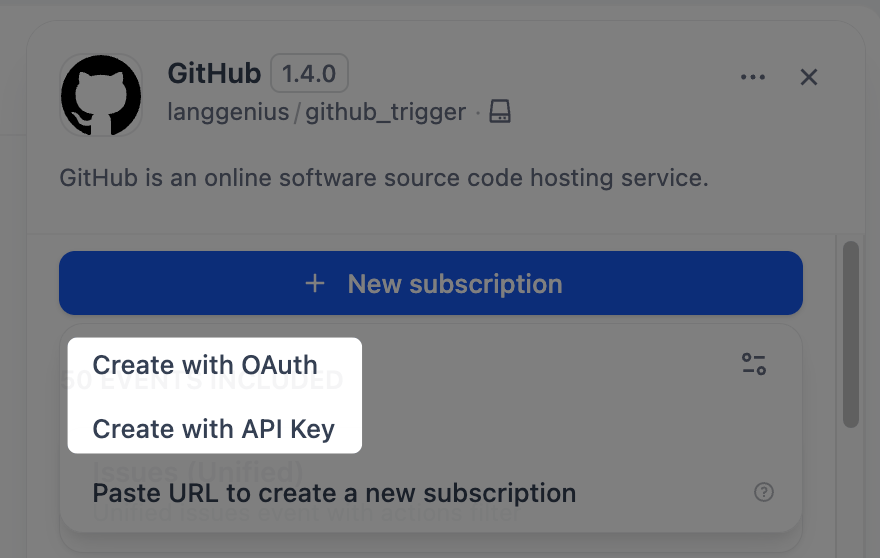
Once you have modified these two files, you'll see the **Create with API Key** option in the Dify interface.
The same `Constructor` class also supports automatic subscription creation via OAuth: add an `oauth_schema` field under `subscription_constructor` to enable OAuth authentication.
In the code, you can retrieve the `webhook_secret` declared in `github.yaml` via `subscription.properties`.
The `dispatch_event` method determines the event type from the request content. In the example below, the `_dispatch_trigger_event` method handles this extraction.
For the complete code sample, see [Dify's GitHub trigger plugin](https://github.com/langgenius/dify-plugin-sdks/tree/main/python/examples/github_trigger).
```python theme={null}
class GithubTrigger(Trigger):
"""Handle GitHub webhook event dispatch."""
def _dispatch_event(self, subscription: Subscription, request: Request) -> EventDispatch:
webhook_secret = subscription.properties.get("webhook_secret")
if webhook_secret:
self._validate_signature(request=request, webhook_secret=webhook_secret)
event_type: str | None = request.headers.get("X-GitHub-Event")
if not event_type:
raise TriggerDispatchError("Missing GitHub event type header")
payload: Mapping[str, Any] = self._validate_payload(request)
response = Response(response='{"status": "ok"}', status=200, mimetype="application/json")
event: str = self._dispatch_trigger_event(event_type=event_type, payload=payload)
return EventDispatch(events=[event] if event else [], response=response)
```
### Handle Events
Once an event is extracted, the corresponding implementation must filter the original HTTP request and transform it into an input format that Dify workflows can accept.
Taking the Issue event as an example, define the event in `events/issues/issues.yaml` and its implementation in `events/issues/issues.py`. Define the event's output in the `output_schema` section of `issues.yaml`, which follows the same JSON Schema specification as tool plugins.
```yaml theme={null}
identity:
name: issues
author: langgenius
label:
en_US: Issues
zh_Hans: 议题
ja_JP: イシュー
description:
en_US: Unified issues event with actions filter
zh_Hans: 带 actions 过滤的统一 issues 事件
ja_JP: アクションフィルタ付きの統合イシューイベント
output_schema:
type: object
properties:
action:
type: string
issue:
type: object
description: The issue itself
extra:
python:
source: events/issues/issues.py
```
```python theme={null}
from collections.abc import Mapping
from typing import Any
from werkzeug import Request
from dify_plugin.entities.trigger import Variables
from dify_plugin.errors.trigger import EventIgnoreError
from dify_plugin.interfaces.trigger import Event
class IssuesUnifiedEvent(Event):
"""Unified Issues event. Filters by actions and common issue attributes."""
def _on_event(self, request: Request, parameters: Mapping[str, Any], payload: Mapping[str, Any]) -> Variables:
payload = request.get_json()
if not payload:
raise ValueError("No payload received")
allowed_actions = parameters.get("actions") or []
action = payload.get("action")
if allowed_actions and action not in allowed_actions:
raise EventIgnoreError()
issue = payload.get("issue")
if not isinstance(issue, Mapping):
raise ValueError("No issue in payload")
return Variables(variables={**payload})
```
### Filter Events
To filter out certain events (for example, to focus only on Issue events with a specific label), add `parameters` to the event definition in `issues.yaml`. Then, in the `_on_event` method, raise an `EventIgnoreError` exception for events that don't meet the configured criteria.
```yaml theme={null}
parameters:
- name: added_label
label:
en_US: Added Label
zh_Hans: 添加的标签
ja_JP: 追加されたラベル
type: string
required: false
description:
en_US: "Only trigger if these specific labels were added (e.g., critical, priority-high, security, comma-separated). Leave empty to trigger for any label addition."
zh_Hans: "仅当添加了这些特定标签时触发(例如:critical, priority-high, security,逗号分隔)。留空则对任何标签添加触发。"
ja_JP: "これらの特定のラベルが追加された場合のみトリガー(例: critical, priority-high, security,カンマ区切り)。空の場合は任意のラベル追加でトリガー。"
```
```python theme={null}
def _check_added_label(self, payload: Mapping[str, Any], added_label_param: str | None) -> None:
"""Check if the added label matches the allowed labels"""
if not added_label_param:
return
allowed_labels = [label.strip() for label in added_label_param.split(",") if label.strip()]
if not allowed_labels:
return
# The payload contains the label that was added
label = payload.get("label", {})
label_name = label.get("name", "")
if label_name not in allowed_labels:
raise EventIgnoreError()
def _on_event(self, request: Request, parameters: Mapping[str, Any], payload: Mapping[str, Any]) -> Variables:
# ...
# Apply all filters
self._check_added_label(payload, parameters.get("added_label"))
return Variables(variables={**payload})
```
### Create Subscriptions via OAuth or API Key
To enable automatic subscription creation via OAuth or API key, modify the `github.yaml` and `github.py` files.
In `github.yaml`, add the following fields.
```yaml theme={null}
subscription_constructor:
parameters:
- name: "repository"
label:
en_US: "Repository"
zh_Hans: "仓库"
ja_JP: "リポジトリ"
type: "dynamic-select"
required: true
placeholder:
en_US: "owner/repo"
zh_Hans: "owner/repo"
ja_JP: "owner/repo"
help:
en_US: "GitHub repository in format owner/repo (e.g., microsoft/vscode)"
zh_Hans: "GitHub 仓库,格式为 owner/repo(例如:microsoft/vscode)"
ja_JP: "GitHubリポジトリは owner/repo 形式で入力してください(例: microsoft/vscode)"
credentials_schema:
access_tokens:
help:
en_US: Get your Access Tokens from GitHub
ja_JP: GitHub からアクセストークンを取得してください
zh_Hans: 从 GitHub 获取您的 Access Tokens
label:
en_US: Access Tokens
ja_JP: アクセストークン
zh_Hans: Access Tokens
placeholder:
en_US: Please input your GitHub Access Tokens
ja_JP: GitHub のアクセストークンを入力してください
zh_Hans: 请输入你的 GitHub Access Tokens
required: true
type: secret-input
url: https://github.com/settings/tokens?type=beta
extra:
python:
source: provider/github.py
```
`subscription_constructor` is a concept abstracted by Dify to define how a subscription is constructed. It includes the following fields:
* `parameters` (optional): Defines the parameters required to create a subscription, such as the event types to subscribe to or the target GitHub repository.
* `credentials_schema` (optional): Declares the credentials required to create a subscription with an API key or access token, such as `access_tokens` for GitHub.
* `oauth_schema` (optional): Required for subscription creation via OAuth. For details on how to define it, see [Add OAuth Support to Your Tool Plugin](/en/develop-plugin/dev-guides-and-walkthroughs/tool-oauth).
In `github.py`, create a `Constructor` class to implement the automatic subscription logic.
```python theme={null}
class GithubSubscriptionConstructor(TriggerSubscriptionConstructor):
"""Manage GitHub trigger subscriptions."""
def _validate_api_key(self, credentials: Mapping[str, Any]) -> None:
# ...
def _create_subscription(
self,
endpoint: str,
parameters: Mapping[str, Any],
credentials: Mapping[str, Any],
credential_type: CredentialType,
) -> Subscription:
repository = parameters.get("repository")
if not repository:
raise ValueError("repository is required (format: owner/repo)")
try:
owner, repo = repository.split("/")
except ValueError:
raise ValueError("repository must be in format 'owner/repo'") from None
events: list[str] = parameters.get("events", [])
webhook_secret = uuid.uuid4().hex
url = f"https://api.github.com/repos/{owner}/{repo}/hooks"
headers = {
"Authorization": f"Bearer {credentials.get('access_tokens')}",
"Accept": "application/vnd.github+json",
}
webhook_data = {
"name": "web",
"active": True,
"events": events,
"config": {"url": endpoint, "content_type": "json", "insecure_ssl": "0", "secret": webhook_secret},
}
try:
response = requests.post(url, json=webhook_data, headers=headers, timeout=10)
except requests.RequestException as exc:
raise SubscriptionError(f"Network error while creating webhook: {exc}", error_code="NETWORK_ERROR") from exc
if response.status_code == 201:
webhook = response.json()
return Subscription(
expires_at=int(time.time()) + self._WEBHOOK_TTL,
endpoint=endpoint,
parameters=parameters,
properties={
"external_id": str(webhook["id"]),
"repository": repository,
"events": events,
"webhook_secret": webhook_secret,
"active": webhook.get("active", True),
},
)
response_data: dict[str, Any] = response.json() if response.content else {}
error_msg = response_data.get("message", "Unknown error")
error_details = response_data.get("errors", [])
detailed_error = f"Failed to create GitHub webhook: {error_msg}"
if error_details:
detailed_error += f" Details: {error_details}"
raise SubscriptionError(
detailed_error,
error_code="WEBHOOK_CREATION_FAILED",
external_response=response_data,
)
```
***
Once you have modified these two files, you'll see the **Create with API Key** option in the Dify interface.
The same `Constructor` class also supports automatic subscription creation via OAuth: add an `oauth_schema` field under `subscription_constructor` to enable OAuth authentication.
 ## Explore More
The interface definitions for the core classes in trigger plugin development are as follows.
### Trigger
```python theme={null}
class Trigger(ABC):
@abstractmethod
def _dispatch_event(self, subscription: Subscription, request: Request) -> EventDispatch:
"""
Internal method to implement event dispatch logic.
Subclasses must override this method to handle incoming webhook events.
Implementation checklist:
1. Validate the webhook request:
- Check the signature/HMAC using the properties stored in subscription.properties when the subscription was created
- Verify the request is from the expected source
2. Extract event information:
- Parse event type from headers or body
- Extract relevant payload data
3. Return EventDispatch with:
- events: List of Event names to invoke (can be single or multiple)
- response: Appropriate HTTP response for the webhook
Args:
subscription: The Subscription object with endpoint and properties fields
request: Incoming webhook HTTP request
Returns:
EventDispatch: Event dispatch routing information
Raises:
TriggerValidationError: For security validation failures
TriggerDispatchError: For parsing or routing errors
"""
raise NotImplementedError("This plugin should implement `_dispatch_event` method to enable event dispatch")
```
### TriggerSubscriptionConstructor
```python theme={null}
class TriggerSubscriptionConstructor(ABC, OAuthProviderProtocol):
# OPTIONAL
def _validate_api_key(self, credentials: Mapping[str, Any]) -> None:
raise NotImplementedError(
"This plugin should implement `_validate_api_key` method to enable credentials validation"
)
# OPTIONAL
def _oauth_get_authorization_url(self, redirect_uri: str, system_credentials: Mapping[str, Any]) -> str:
raise NotImplementedError(
"The trigger you are using does not support OAuth, please implement `_oauth_get_authorization_url` method"
)
# OPTIONAL
def _oauth_get_credentials(
self, redirect_uri: str, system_credentials: Mapping[str, Any], request: Request
) -> TriggerOAuthCredentials:
raise NotImplementedError(
"The trigger you are using does not support OAuth, please implement `_oauth_get_credentials` method"
)
# OPTIONAL
def _oauth_refresh_credentials(
self, redirect_uri: str, system_credentials: Mapping[str, Any], credentials: Mapping[str, Any]
) -> OAuthCredentials:
raise NotImplementedError(
"The trigger you are using does not support OAuth, please implement `_oauth_refresh_credentials` method"
)
@abstractmethod
def _create_subscription(
self,
endpoint: str,
parameters: Mapping[str, Any],
credentials: Mapping[str, Any],
credential_type: CredentialType,
) -> Subscription:
"""
Internal method to implement subscription logic.
Subclasses must override this method to handle subscription creation.
Implementation checklist:
1. Use the endpoint parameter provided by Dify
2. Register webhook with external service using their API
3. Store all necessary information in Subscription.properties for future operations (e.g., dispatch_event)
4. Return Subscription with:
- expires_at: Set appropriate expiration time
- endpoint: The webhook endpoint URL allocated by Dify for receiving events, same as the endpoint parameter
- parameters: The parameters of the subscription
- properties: All configuration and external IDs
Args:
endpoint: The webhook endpoint URL allocated by Dify for receiving events
parameters: Subscription creation parameters
credentials: Authentication credentials
credential_type: The type of the credentials, e.g., "api-key", "oauth2", "unauthorized"
Returns:
Subscription: Subscription details with metadata for future operations
Raises:
SubscriptionError: For operational failures (API errors, invalid credentials)
ValueError: For programming errors (missing required params)
"""
raise NotImplementedError(
"This plugin should implement `_create_subscription` method to enable event subscription"
)
@abstractmethod
def _delete_subscription(
self, subscription: Subscription, credentials: Mapping[str, Any], credential_type: CredentialType
) -> UnsubscribeResult:
"""
Internal method to implement unsubscription logic.
Subclasses must override this method to handle subscription removal.
Implementation guidelines:
1. Extract necessary IDs from subscription.properties (e.g., external_id)
2. Use credentials and credential_type to call external service API to delete the webhook
3. Handle common errors (not found, unauthorized, etc.)
4. Always return UnsubscribeResult with detailed status
5. Never raise exceptions for operational failures - use UnsubscribeResult.success=False
Args:
subscription: The Subscription object with endpoint and properties fields
Returns:
UnsubscribeResult: Always returns result, never raises for operational failures
"""
raise NotImplementedError(
"This plugin should implement `_delete_subscription` method to enable event unsubscription"
)
@abstractmethod
def _refresh_subscription(
self, subscription: Subscription, credentials: Mapping[str, Any], credential_type: CredentialType
) -> Subscription:
"""
Internal method to implement subscription refresh logic.
Subclasses must override this method to handle simple expiration extension.
Implementation patterns:
1. For webhooks without expiration (e.g., GitHub):
- Update the Subscription.expires_at=-1 then Dify will never call this method again
2. For lease-based subscriptions (e.g., Microsoft Graph):
- Use the information in Subscription.properties to call service's lease renewal API if available
- Handle renewal limits (some services limit renewal count)
- Update Subscription.properties and Subscription.expires_at for the next renewal if needed
Args:
subscription: Current subscription with properties
credential_type: The type of the credentials, e.g., "api-key", "oauth2", "unauthorized"
credentials: Current authentication credentials from credentials_schema.
For API key auth, according to `credentials_schema` defined in the YAML.
For OAuth auth, according to `oauth_schema.credentials_schema` defined in the YAML.
For unauthorized auth, there is no credentials.
Returns:
Subscription: Same subscription with extended expiration
or new properties and expires_at for the next renewal
Raises:
SubscriptionError: For operational failures (API errors, invalid credentials)
"""
raise NotImplementedError("This plugin should implement `_refresh` method to enable subscription refresh")
# OPTIONAL
def _fetch_parameter_options(
self, parameter: str, credentials: Mapping[str, Any], credential_type: CredentialType
) -> list[ParameterOption]:
"""
Fetch the parameter options of the trigger.
Implementation guidelines:
When you need to fetch parameter options from an external service, use the credentials
and credential_type to call the external service API, then return the options to Dify
for user selection.
Args:
parameter: The parameter name for which to fetch options
credentials: Authentication credentials for the external service
credential_type: The type of credentials (e.g., "api-key", "oauth2", "unauthorized")
Returns:
list[ParameterOption]: A list of available options for the parameter
Examples:
GitHub Repositories:
>>> result = provider.fetch_parameter_options(parameter="repository")
>>> print(result) # [ParameterOption(label="owner/repo", value="owner/repo")]
Slack Channels:
>>> result = provider.fetch_parameter_options(parameter="channel")
>>> print(result)
```
### Event
```python theme={null}
class Event(ABC):
@abstractmethod
def _on_event(self, request: Request, parameters: Mapping[str, Any], payload: Mapping[str, Any]) -> Variables:
"""
Transform the incoming webhook request into structured Variables.
This method should:
1. Parse the webhook payload from the request
2. Apply filtering logic based on parameters
3. Extract relevant data matching the output_schema
4. Return a structured Variables object
Args:
request: The incoming webhook HTTP request containing the raw payload.
Use request.get_json() to parse JSON body.
parameters: User-configured parameters for filtering and transformation
(e.g., label filters, regex patterns, threshold values).
These come from the subscription configuration.
payload: The decoded payload from previous step `Trigger.dispatch_event`.
It will be delivered into `_on_event` method.
Returns:
Variables: Structured variables matching the output_schema
defined in the event's YAML configuration.
Raises:
EventIgnoreError: When the event should be filtered out based on parameters
ValueError: When the payload is invalid or missing required fields
Example:
>>> def _on_event(self, request, parameters):
... payload = request.get_json()
...
... # Apply filters
... if not self._matches_filters(payload, parameters):
... raise EventIgnoreError()
...
... # Transform data
... return Variables(variables={
... "title": payload["issue"]["title"],
... "author": payload["issue"]["user"]["login"],
... "url": payload["issue"]["html_url"],
... })
"""
def _fetch_parameter_options(self, parameter: str) -> list[ParameterOption]:
"""
Fetch the parameter options of the trigger.
To be implemented by subclasses.
Implementing it is optional, which is why it's not an abstract method.
"""
raise NotImplementedError(
"This plugin should implement `_fetch_parameter_options` method to enable dynamic select parameter"
)
```
## Explore More
The interface definitions for the core classes in trigger plugin development are as follows.
### Trigger
```python theme={null}
class Trigger(ABC):
@abstractmethod
def _dispatch_event(self, subscription: Subscription, request: Request) -> EventDispatch:
"""
Internal method to implement event dispatch logic.
Subclasses must override this method to handle incoming webhook events.
Implementation checklist:
1. Validate the webhook request:
- Check the signature/HMAC using the properties stored in subscription.properties when the subscription was created
- Verify the request is from the expected source
2. Extract event information:
- Parse event type from headers or body
- Extract relevant payload data
3. Return EventDispatch with:
- events: List of Event names to invoke (can be single or multiple)
- response: Appropriate HTTP response for the webhook
Args:
subscription: The Subscription object with endpoint and properties fields
request: Incoming webhook HTTP request
Returns:
EventDispatch: Event dispatch routing information
Raises:
TriggerValidationError: For security validation failures
TriggerDispatchError: For parsing or routing errors
"""
raise NotImplementedError("This plugin should implement `_dispatch_event` method to enable event dispatch")
```
### TriggerSubscriptionConstructor
```python theme={null}
class TriggerSubscriptionConstructor(ABC, OAuthProviderProtocol):
# OPTIONAL
def _validate_api_key(self, credentials: Mapping[str, Any]) -> None:
raise NotImplementedError(
"This plugin should implement `_validate_api_key` method to enable credentials validation"
)
# OPTIONAL
def _oauth_get_authorization_url(self, redirect_uri: str, system_credentials: Mapping[str, Any]) -> str:
raise NotImplementedError(
"The trigger you are using does not support OAuth, please implement `_oauth_get_authorization_url` method"
)
# OPTIONAL
def _oauth_get_credentials(
self, redirect_uri: str, system_credentials: Mapping[str, Any], request: Request
) -> TriggerOAuthCredentials:
raise NotImplementedError(
"The trigger you are using does not support OAuth, please implement `_oauth_get_credentials` method"
)
# OPTIONAL
def _oauth_refresh_credentials(
self, redirect_uri: str, system_credentials: Mapping[str, Any], credentials: Mapping[str, Any]
) -> OAuthCredentials:
raise NotImplementedError(
"The trigger you are using does not support OAuth, please implement `_oauth_refresh_credentials` method"
)
@abstractmethod
def _create_subscription(
self,
endpoint: str,
parameters: Mapping[str, Any],
credentials: Mapping[str, Any],
credential_type: CredentialType,
) -> Subscription:
"""
Internal method to implement subscription logic.
Subclasses must override this method to handle subscription creation.
Implementation checklist:
1. Use the endpoint parameter provided by Dify
2. Register webhook with external service using their API
3. Store all necessary information in Subscription.properties for future operations (e.g., dispatch_event)
4. Return Subscription with:
- expires_at: Set appropriate expiration time
- endpoint: The webhook endpoint URL allocated by Dify for receiving events, same as the endpoint parameter
- parameters: The parameters of the subscription
- properties: All configuration and external IDs
Args:
endpoint: The webhook endpoint URL allocated by Dify for receiving events
parameters: Subscription creation parameters
credentials: Authentication credentials
credential_type: The type of the credentials, e.g., "api-key", "oauth2", "unauthorized"
Returns:
Subscription: Subscription details with metadata for future operations
Raises:
SubscriptionError: For operational failures (API errors, invalid credentials)
ValueError: For programming errors (missing required params)
"""
raise NotImplementedError(
"This plugin should implement `_create_subscription` method to enable event subscription"
)
@abstractmethod
def _delete_subscription(
self, subscription: Subscription, credentials: Mapping[str, Any], credential_type: CredentialType
) -> UnsubscribeResult:
"""
Internal method to implement unsubscription logic.
Subclasses must override this method to handle subscription removal.
Implementation guidelines:
1. Extract necessary IDs from subscription.properties (e.g., external_id)
2. Use credentials and credential_type to call external service API to delete the webhook
3. Handle common errors (not found, unauthorized, etc.)
4. Always return UnsubscribeResult with detailed status
5. Never raise exceptions for operational failures - use UnsubscribeResult.success=False
Args:
subscription: The Subscription object with endpoint and properties fields
Returns:
UnsubscribeResult: Always returns result, never raises for operational failures
"""
raise NotImplementedError(
"This plugin should implement `_delete_subscription` method to enable event unsubscription"
)
@abstractmethod
def _refresh_subscription(
self, subscription: Subscription, credentials: Mapping[str, Any], credential_type: CredentialType
) -> Subscription:
"""
Internal method to implement subscription refresh logic.
Subclasses must override this method to handle simple expiration extension.
Implementation patterns:
1. For webhooks without expiration (e.g., GitHub):
- Update the Subscription.expires_at=-1 then Dify will never call this method again
2. For lease-based subscriptions (e.g., Microsoft Graph):
- Use the information in Subscription.properties to call service's lease renewal API if available
- Handle renewal limits (some services limit renewal count)
- Update Subscription.properties and Subscription.expires_at for the next renewal if needed
Args:
subscription: Current subscription with properties
credential_type: The type of the credentials, e.g., "api-key", "oauth2", "unauthorized"
credentials: Current authentication credentials from credentials_schema.
For API key auth, according to `credentials_schema` defined in the YAML.
For OAuth auth, according to `oauth_schema.credentials_schema` defined in the YAML.
For unauthorized auth, there is no credentials.
Returns:
Subscription: Same subscription with extended expiration
or new properties and expires_at for the next renewal
Raises:
SubscriptionError: For operational failures (API errors, invalid credentials)
"""
raise NotImplementedError("This plugin should implement `_refresh` method to enable subscription refresh")
# OPTIONAL
def _fetch_parameter_options(
self, parameter: str, credentials: Mapping[str, Any], credential_type: CredentialType
) -> list[ParameterOption]:
"""
Fetch the parameter options of the trigger.
Implementation guidelines:
When you need to fetch parameter options from an external service, use the credentials
and credential_type to call the external service API, then return the options to Dify
for user selection.
Args:
parameter: The parameter name for which to fetch options
credentials: Authentication credentials for the external service
credential_type: The type of credentials (e.g., "api-key", "oauth2", "unauthorized")
Returns:
list[ParameterOption]: A list of available options for the parameter
Examples:
GitHub Repositories:
>>> result = provider.fetch_parameter_options(parameter="repository")
>>> print(result) # [ParameterOption(label="owner/repo", value="owner/repo")]
Slack Channels:
>>> result = provider.fetch_parameter_options(parameter="channel")
>>> print(result)
```
### Event
```python theme={null}
class Event(ABC):
@abstractmethod
def _on_event(self, request: Request, parameters: Mapping[str, Any], payload: Mapping[str, Any]) -> Variables:
"""
Transform the incoming webhook request into structured Variables.
This method should:
1. Parse the webhook payload from the request
2. Apply filtering logic based on parameters
3. Extract relevant data matching the output_schema
4. Return a structured Variables object
Args:
request: The incoming webhook HTTP request containing the raw payload.
Use request.get_json() to parse JSON body.
parameters: User-configured parameters for filtering and transformation
(e.g., label filters, regex patterns, threshold values).
These come from the subscription configuration.
payload: The decoded payload from previous step `Trigger.dispatch_event`.
It will be delivered into `_on_event` method.
Returns:
Variables: Structured variables matching the output_schema
defined in the event's YAML configuration.
Raises:
EventIgnoreError: When the event should be filtered out based on parameters
ValueError: When the payload is invalid or missing required fields
Example:
>>> def _on_event(self, request, parameters):
... payload = request.get_json()
...
... # Apply filters
... if not self._matches_filters(payload, parameters):
... raise EventIgnoreError()
...
... # Transform data
... return Variables(variables={
... "title": payload["issue"]["title"],
... "author": payload["issue"]["user"]["login"],
... "url": payload["issue"]["html_url"],
... })
"""
def _fetch_parameter_options(self, parameter: str) -> list[ParameterOption]:
"""
Fetch the parameter options of the trigger.
To be implemented by subclasses.
Implementing it is optional, which is why it's not an abstract method.
"""
raise NotImplementedError(
"This plugin should implement `_fetch_parameter_options` method to enable dynamic select parameter"
)
```